---
title: Online Versus In-Store Sales
description: Online Versus In-Store Sales
---
[Skip to content](https://knowledge.techpos.ca/en/knowledge/onlineversus-in-store-sales#main-content)
[Customer portal](https://knowledge.techpos.ca/portal?hsLang=en)

Open main navigation
Close main navigation
- [Customer portal](https://knowledge.techpos.ca/portal)
Hello. How can we help you?
- There are no suggestions because the search field is empty.
1. [Knowledge Base](https://knowledge.techpos.ca/en/knowledge?hsLang=en)
2. [Reports](https://knowledge.techpos.ca/en/knowledge/reports?hsLang=en)
3. [Sales Reports](https://knowledge.techpos.ca/en/knowledge/reports?hsLang=en#sales-reports)
# Online Versus In-Store Sales
## Compare the sales value of your products between in-store and online sales channels.
####
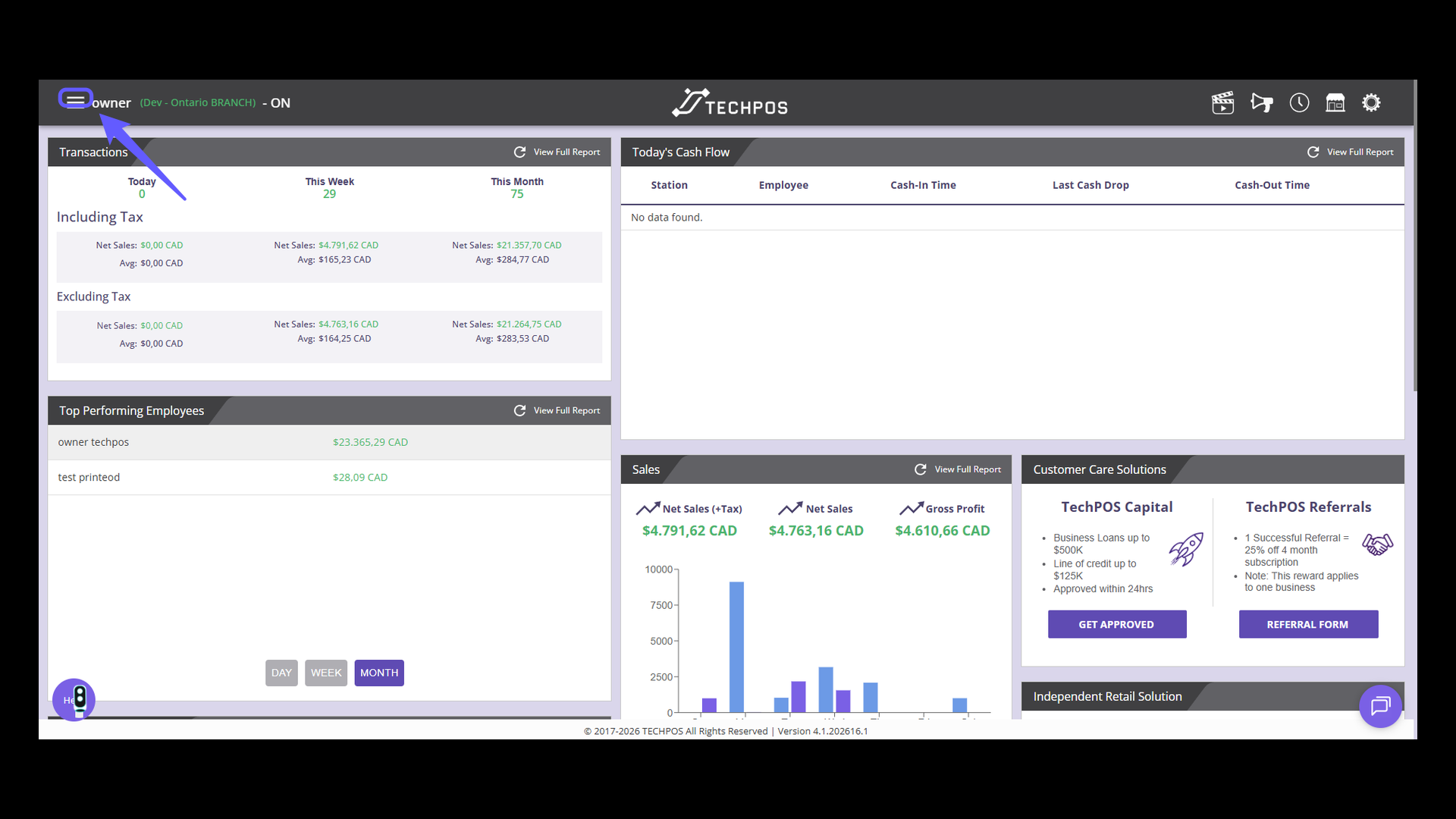
### 1. Open the Menu
Click the three horizontal lines to open the menu.
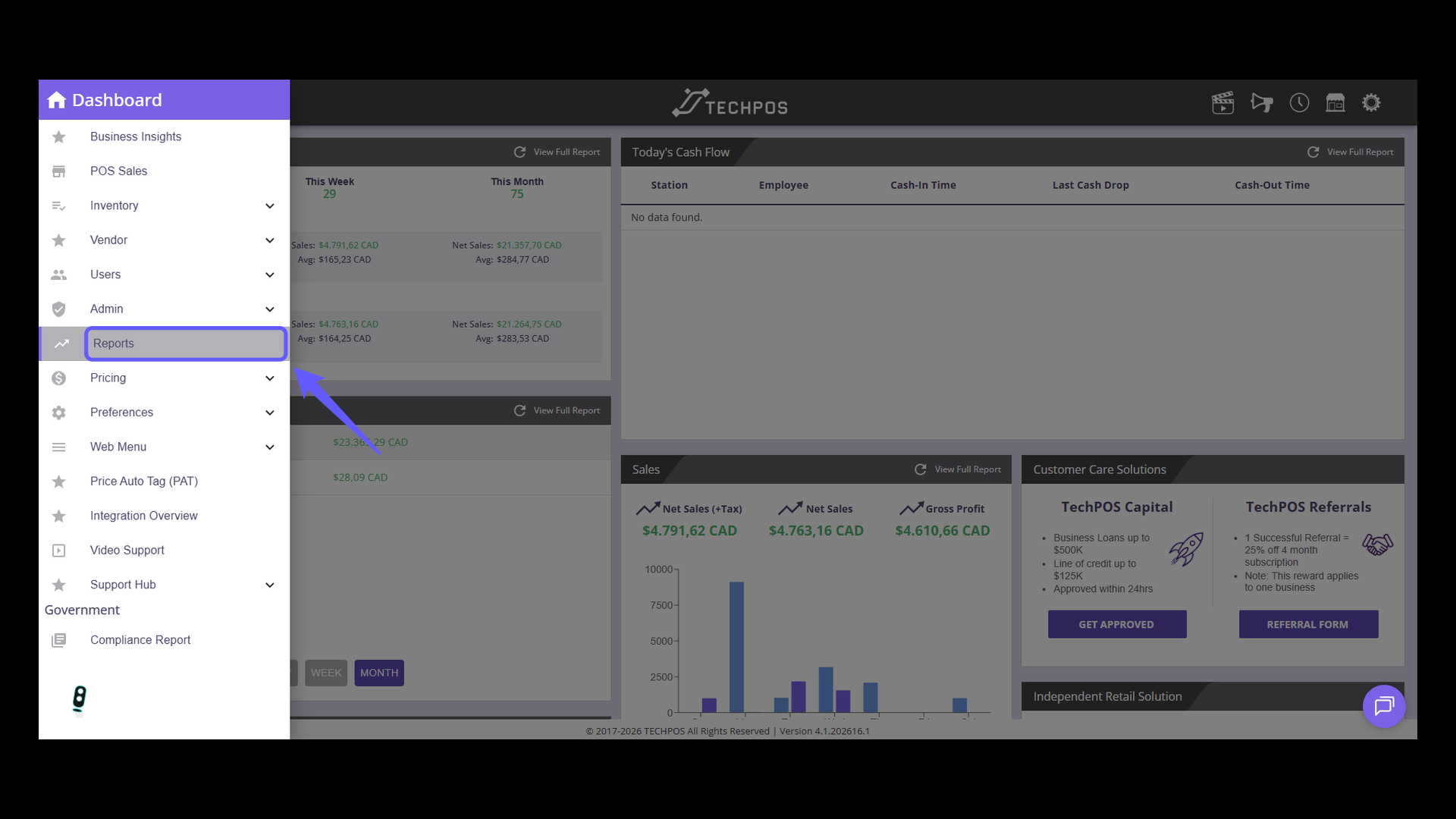
### 2. Access Reports Menu
Choose 'Reports' from the menu to explore comprehensive TechPOS Reports.
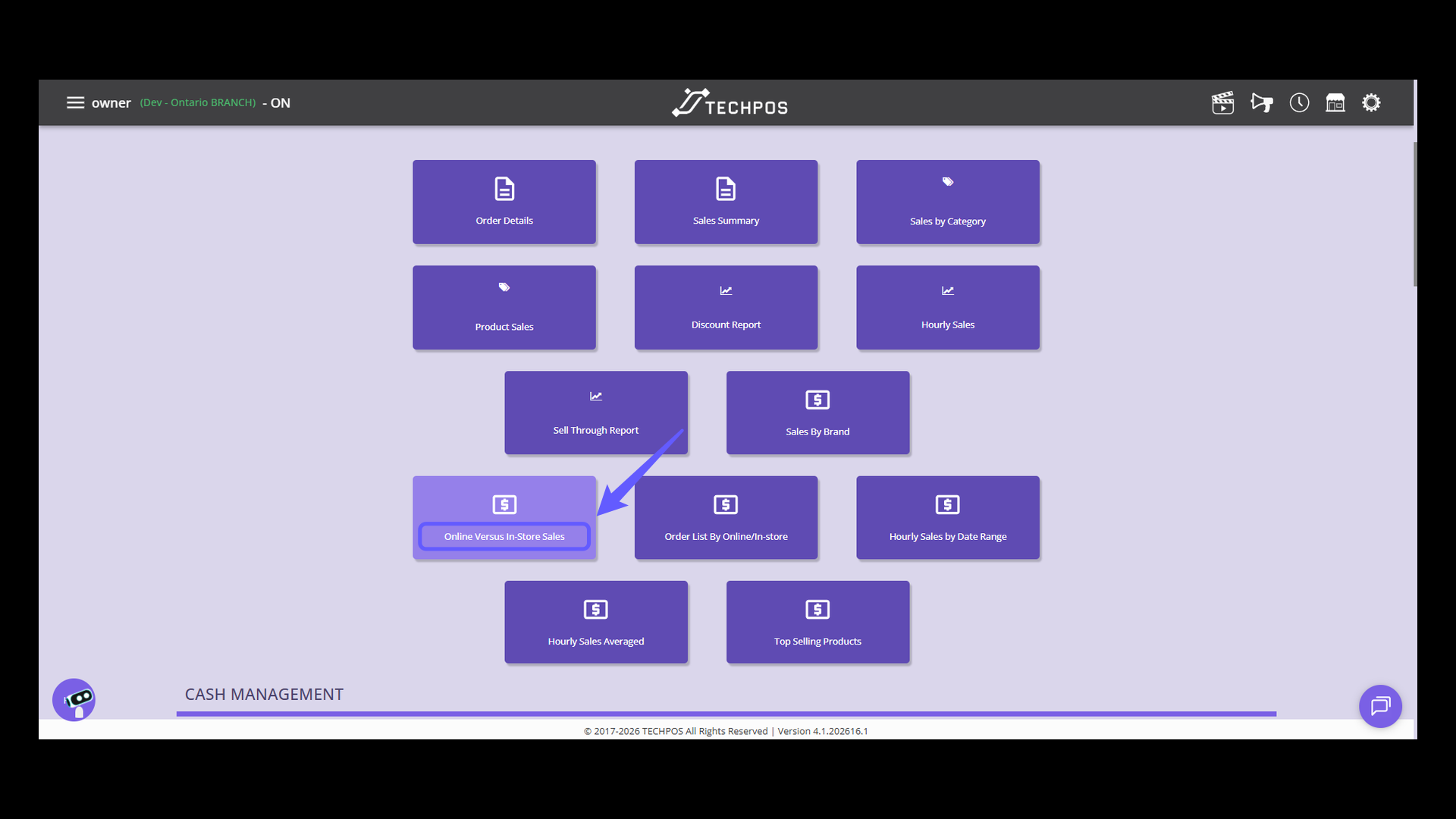
### 3. Access Online Versus In-Store Sales Report
Head to the Reports page, find the Sales section, and choose the 'Online Versus In-Store Sales' option to compare data across various sales channels.
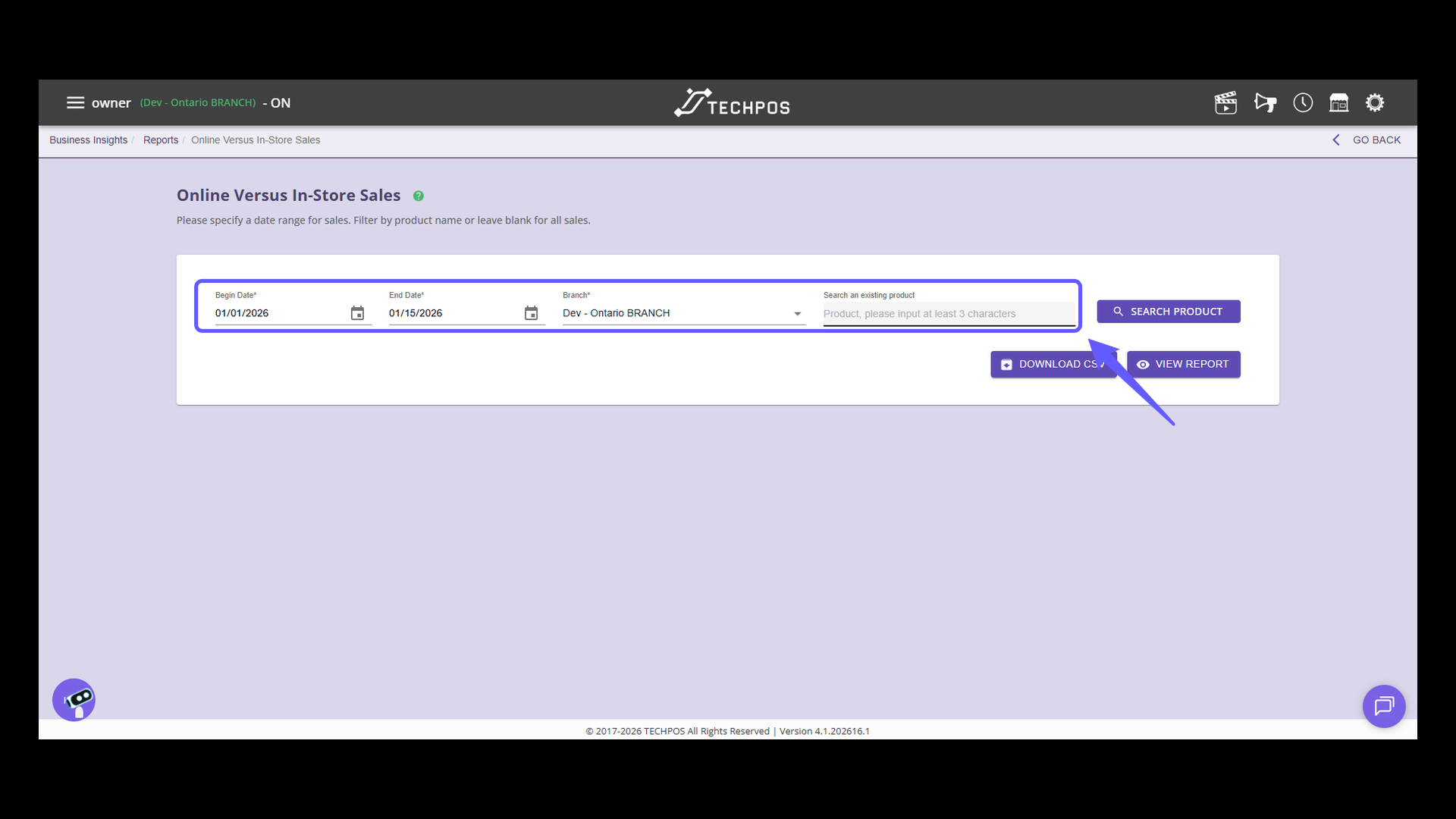
### 4. Input Product Search Query
Choose a date range and branch to view sales. Input a product name to narrow down results to see sales for specific products within the selected criteria.
### 5. Search all products sales by filtered range
Leave the product name field blank and click "View Report" to display all sales comparisons within the selected date range.
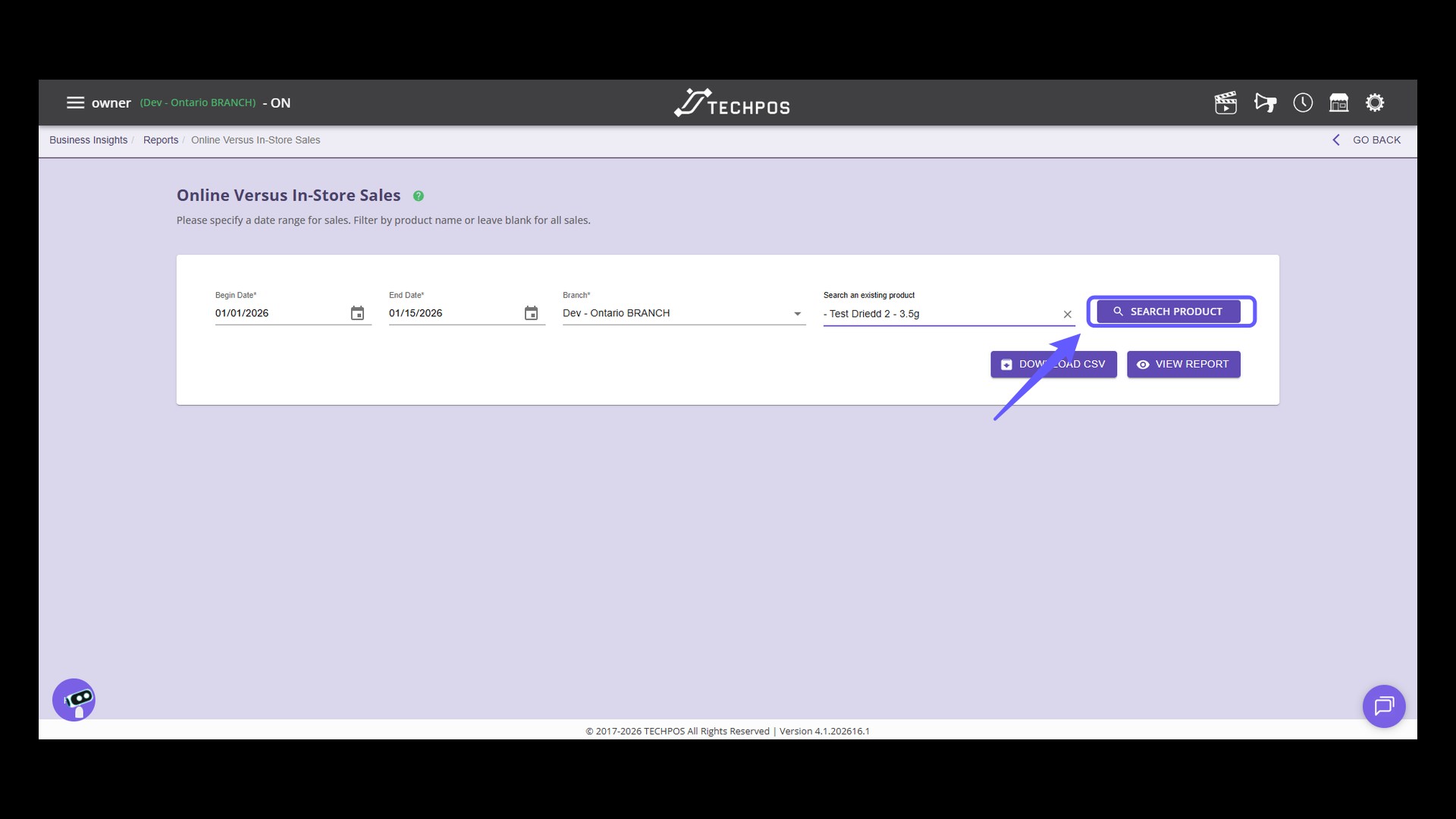
### 6. Initiate Product Search
To filter your search by product, simply type in the product name and click 'SEARCH PRODUCT.' This will kick off the lookup process using your specified criteria, such as the date range and chosen branch.
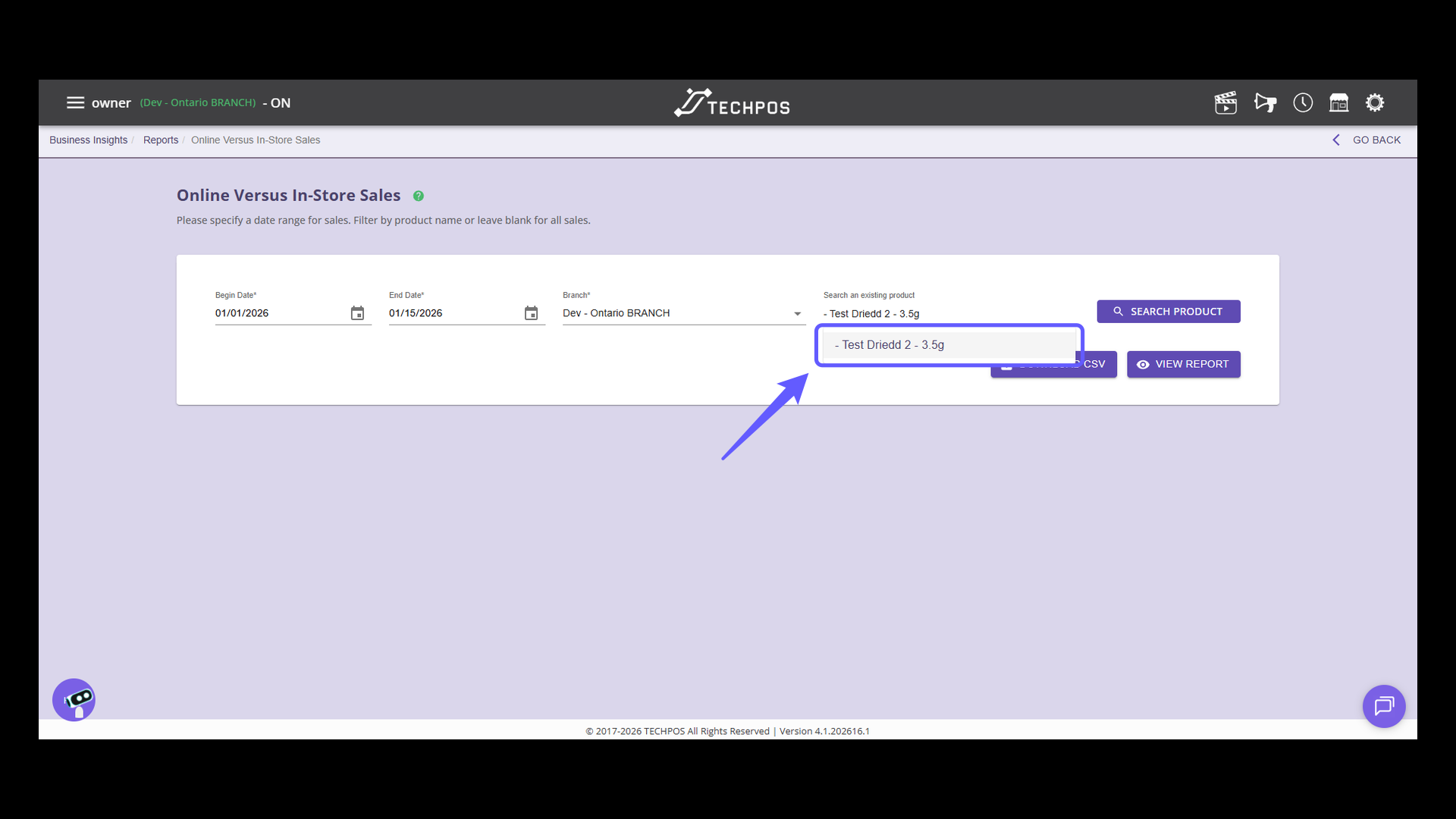
### 7. Select Product for Analysis
Select the product search dropdown to include it in your sales report analysis.
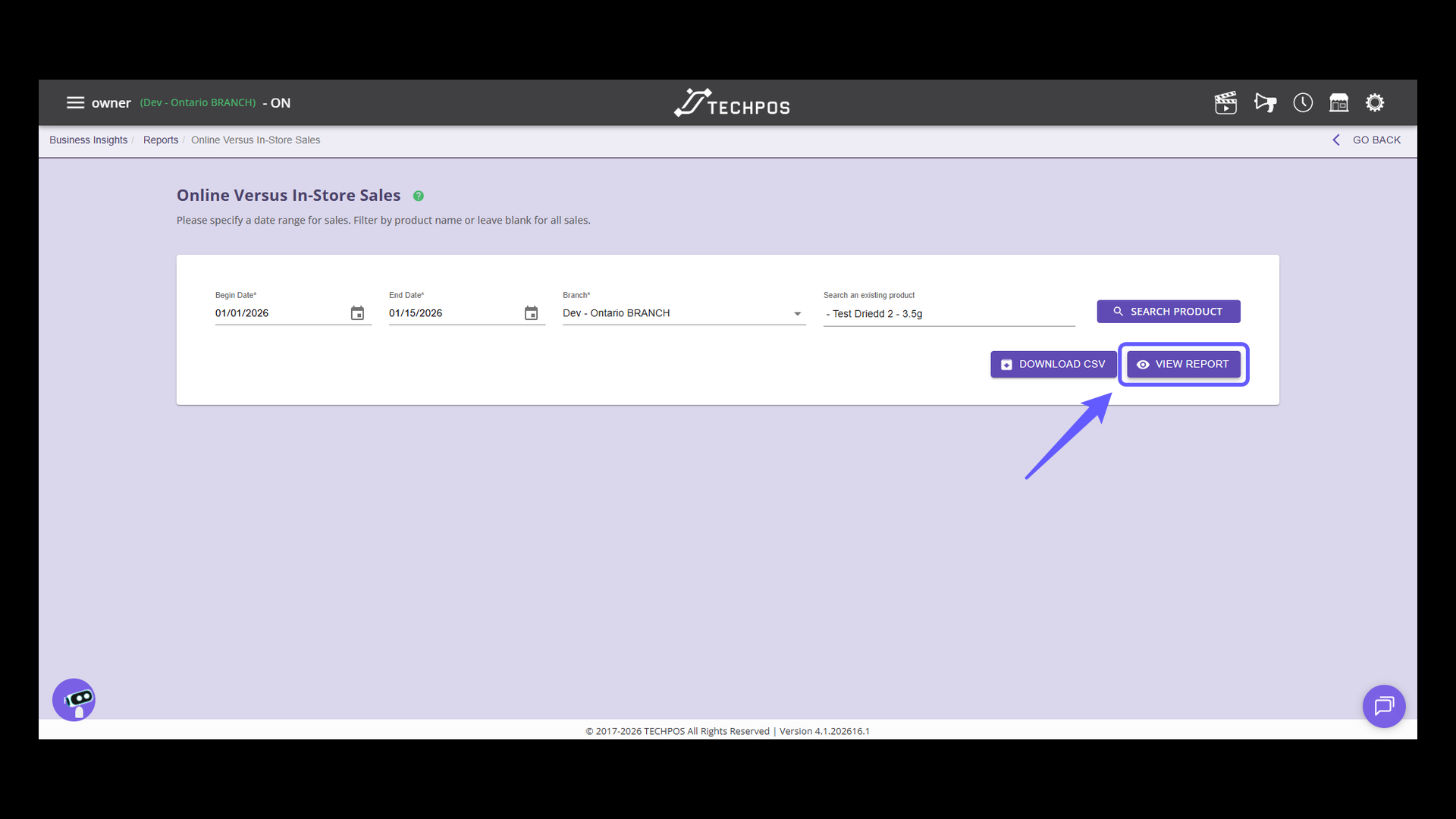
### 8. Access the Sales Report
Click on 'VIEW REPORT' to generate and view the sales report based on the specified criteria.
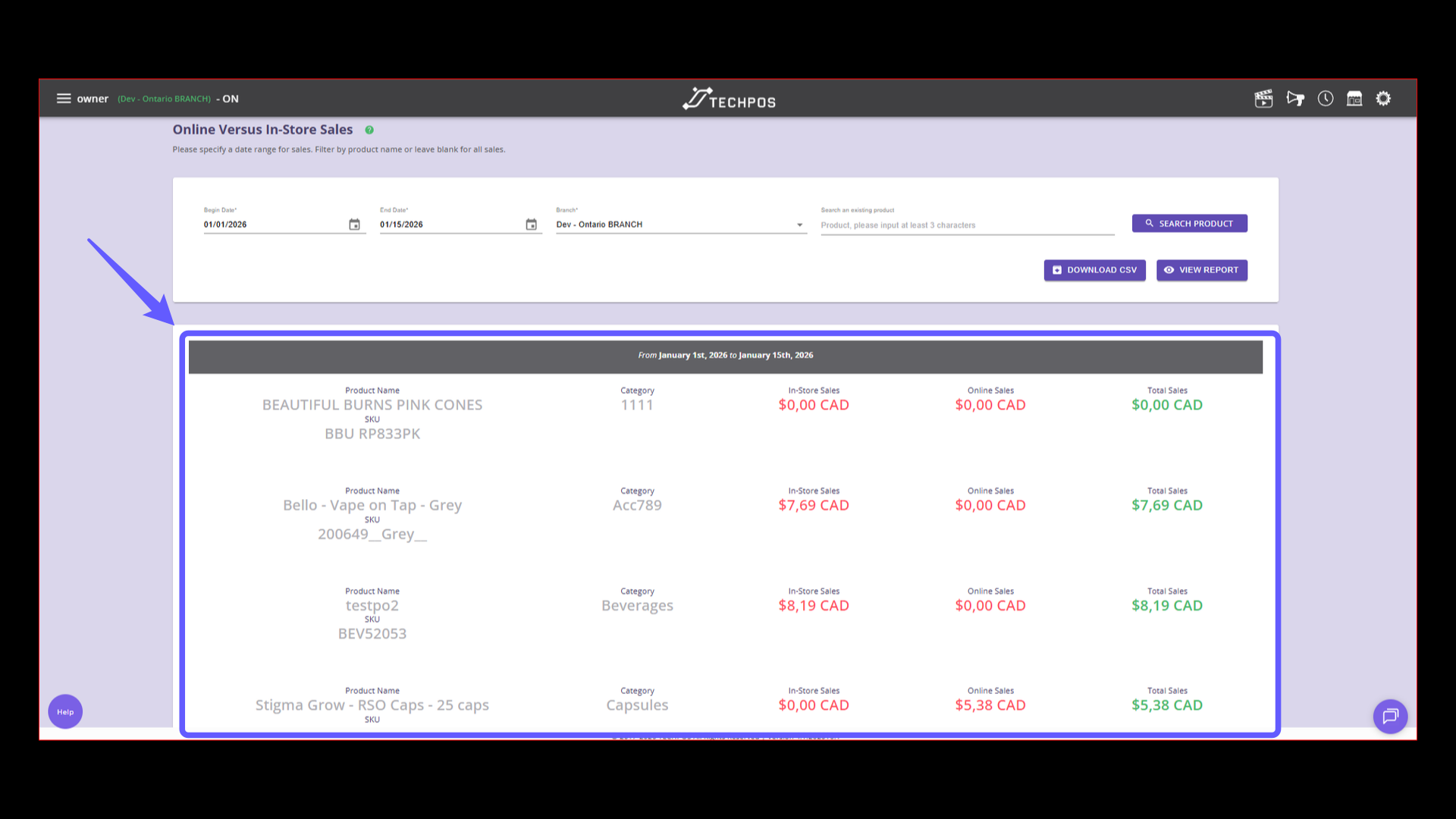
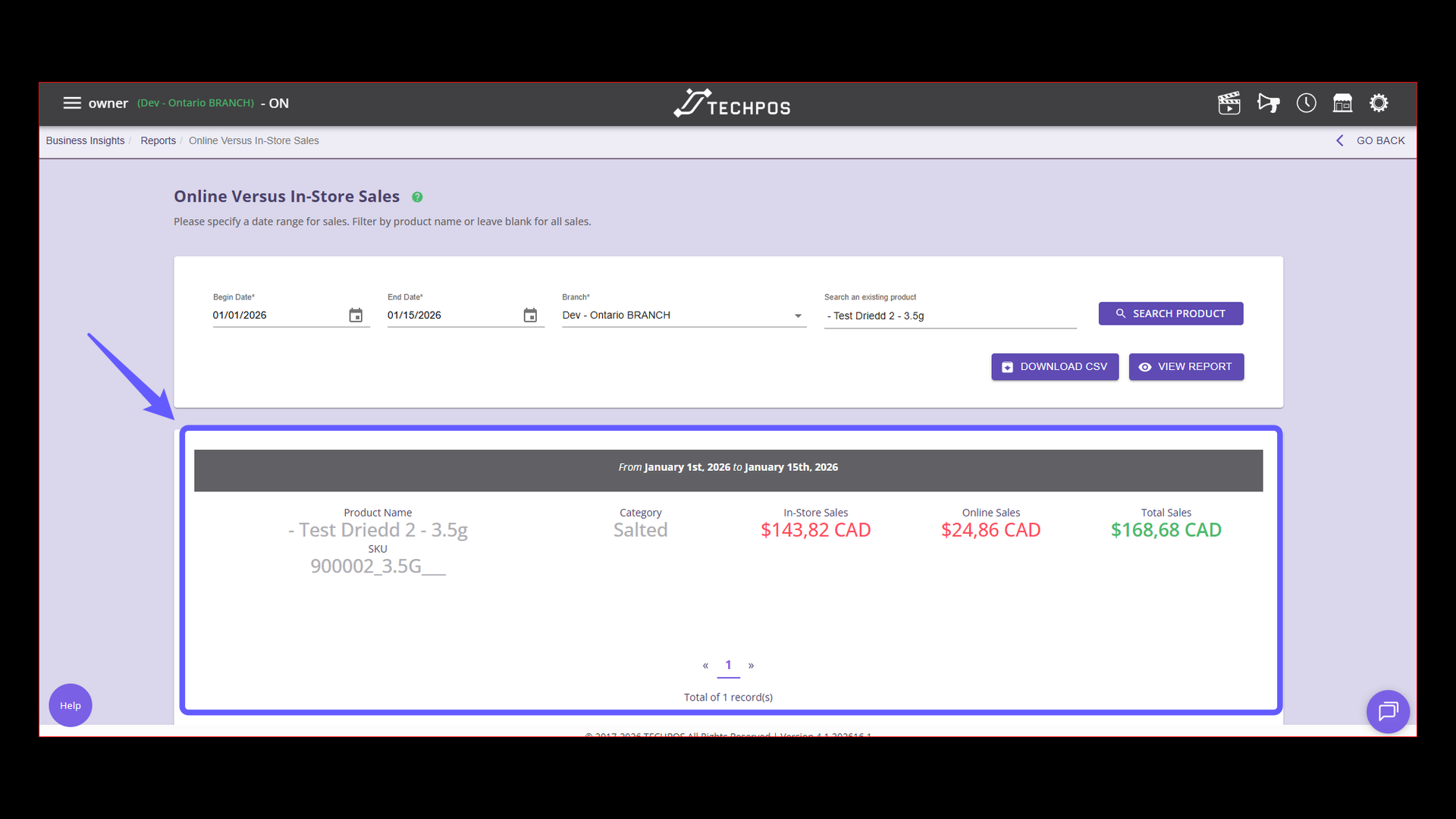
### 9. Report Overview
Examine the report to compare products sold in-store and online, with a focus on sales values for each channel. For any further questions, please reach out to the TechPOS Support team.
- [Line of Products](https://knowledge.techpos.ca/en/knowledge/line-of-products?hsLang=en#main-content)
- [Express Checkout](https://knowledge.techpos.ca/en/knowledge/line-of-products?hsLang=en#express-checkout)
- [E-Commerce](https://knowledge.techpos.ca/en/knowledge/line-of-products?hsLang=en#e-commerce)
- [Digital Signage](https://knowledge.techpos.ca/en/knowledge/line-of-products?hsLang=en#digital-signage)
- [Cannabis Analytics](https://knowledge.techpos.ca/en/knowledge/line-of-products?hsLang=en#cannabis-analytics)
- [Auto Tag](https://knowledge.techpos.ca/en/knowledge/line-of-products?hsLang=en#auto-tag)
- [Getting Started](https://knowledge.techpos.ca/en/knowledge/getting-started?hsLang=en#main-content)
- [Hardware Setup](https://knowledge.techpos.ca/en/knowledge/getting-started?hsLang=en#hardware-setup)
- [Online Menu Setup](https://knowledge.techpos.ca/en/knowledge/getting-started?hsLang=en#online-menu-setup)
- [Integrations](https://knowledge.techpos.ca/en/knowledge/getting-started?hsLang=en#integrations)
- [Business Insights](https://knowledge.techpos.ca/en/knowledge/business-insights?hsLang=en)
- [Point of Sale](https://knowledge.techpos.ca/en/knowledge/point-of-sale?hsLang=en#main-content)
- [POS Sales Configuration Options](https://knowledge.techpos.ca/en/knowledge/point-of-sale?hsLang=en#pos-sales-configuration-options)
- [Opening & Closing The Cash Register](https://knowledge.techpos.ca/en/knowledge/point-of-sale?hsLang=en#opening-closing-the-cash-register)
- [Processing In-Store Transactions](https://knowledge.techpos.ca/en/knowledge/point-of-sale?hsLang=en#processing-in-store-transactions)
- [Managing Members](https://knowledge.techpos.ca/en/knowledge/point-of-sale?hsLang=en#managing-members)
- [Refunds](https://knowledge.techpos.ca/en/knowledge/point-of-sale?hsLang=en#refunds)
- [Store Credit](https://knowledge.techpos.ca/en/knowledge/point-of-sale?hsLang=en#store-credit)
- [Discounts](https://knowledge.techpos.ca/en/knowledge/point-of-sale?hsLang=en#discounts)
- [Payment](https://knowledge.techpos.ca/en/knowledge/point-of-sale?hsLang=en#payment)
- [Inventory](https://knowledge.techpos.ca/en/knowledge/inventory?hsLang=en#main-content)
- [Products](https://knowledge.techpos.ca/en/knowledge/inventory?hsLang=en#products)
- [Categories](https://knowledge.techpos.ca/en/knowledge/inventory?hsLang=en#categories)
- [Purchase Orders](https://knowledge.techpos.ca/en/knowledge/inventory?hsLang=en#purchase-orders)
- [Warehouse](https://knowledge.techpos.ca/en/knowledge/inventory?hsLang=en#warehouse)
- [Bulk Transfer](https://knowledge.techpos.ca/en/knowledge/inventory?hsLang=en#bulk-transfer)
- [Product Hub](https://knowledge.techpos.ca/en/knowledge/inventory?hsLang=en#product-hub)
- [Inventory Audit](https://knowledge.techpos.ca/en/knowledge/inventory?hsLang=en#inventory-audit)
- [Vendor](https://knowledge.techpos.ca/en/knowledge/vendor?hsLang=en)
- [Users](https://knowledge.techpos.ca/en/knowledge/users?hsLang=en#main-content)
- [Member](https://knowledge.techpos.ca/en/knowledge/users?hsLang=en#member)
- [Employee](https://knowledge.techpos.ca/en/knowledge/users?hsLang=en#employee)
- [User Role](https://knowledge.techpos.ca/en/knowledge/users?hsLang=en#user-role)
- [Member Group/Tiered Membership](https://knowledge.techpos.ca/en/knowledge/users?hsLang=en#member-group-tiered-membership)
- [Admin](https://knowledge.techpos.ca/en/knowledge/admin?hsLang=en#main-content)
- [Cash Register](https://knowledge.techpos.ca/en/knowledge/admin?hsLang=en#cash-register)
- [Safe Management](https://knowledge.techpos.ca/en/knowledge/admin?hsLang=en#safe-management)
- [Shifts](https://knowledge.techpos.ca/en/knowledge/admin?hsLang=en#shifts)
- [Schedules](https://knowledge.techpos.ca/en/knowledge/admin?hsLang=en#schedules)
- [Orders](https://knowledge.techpos.ca/en/knowledge/admin?hsLang=en#orders)
- [Marketing](https://knowledge.techpos.ca/en/knowledge/admin?hsLang=en#marketing)
- [Settings](https://knowledge.techpos.ca/en/knowledge/admin?hsLang=en#settings)
- [Reports](https://knowledge.techpos.ca/en/knowledge/reports?hsLang=en#main-content)
- [Sales Reports](https://knowledge.techpos.ca/en/knowledge/reports?hsLang=en#sales-reports)
- [Cash Management](https://knowledge.techpos.ca/en/knowledge/reports?hsLang=en#cash-management)
- [Employee](https://knowledge.techpos.ca/en/knowledge/reports?hsLang=en#employee)
- [Inventory](https://knowledge.techpos.ca/en/knowledge/reports?hsLang=en#inventory)
- [Consolidated Reports](https://knowledge.techpos.ca/en/knowledge/reports?hsLang=en#consolidated-reports)
- [Members](https://knowledge.techpos.ca/en/knowledge/reports?hsLang=en#members)
- [Compliance](https://knowledge.techpos.ca/en/knowledge/reports?hsLang=en#compliance)
- [Pricing](https://knowledge.techpos.ca/en/knowledge/pricing?hsLang=en#main-content)
- [Tax Setting](https://knowledge.techpos.ca/en/knowledge/pricing?hsLang=en#tax-setting)
- [Campaigns](https://knowledge.techpos.ca/en/knowledge/pricing?hsLang=en#campaigns)
- [Combo](https://knowledge.techpos.ca/en/knowledge/pricing?hsLang=en#combo)
- [Customized Discount](https://knowledge.techpos.ca/en/knowledge/pricing?hsLang=en#customized-discount)
- [Bulk Price Update](https://knowledge.techpos.ca/en/knowledge/pricing?hsLang=en#bulk-price-update)
- [Web Menu](https://knowledge.techpos.ca/en/knowledge/web-menu?hsLang=en#main-content)
- [Store Rules List](https://knowledge.techpos.ca/en/knowledge/web-menu?hsLang=en#store-rules-list)
- [Menu (Categories) List](https://knowledge.techpos.ca/en/knowledge/web-menu?hsLang=en#menu-categories-list)
- [Carousel List](https://knowledge.techpos.ca/en/knowledge/web-menu?hsLang=en#carousel-list)
- [UI Setting](https://knowledge.techpos.ca/en/knowledge/web-menu?hsLang=en#ui-setting)
- [Integrations](https://knowledge.techpos.ca/en/knowledge/integrations?hsLang=en#main-content)
- [E-Commerce](https://knowledge.techpos.ca/en/knowledge/integrations?hsLang=en#e-commerce)
- [Compliance Report](https://knowledge.techpos.ca/en/knowledge/compliance-report?hsLang=en)
- [FAQs](https://knowledge.techpos.ca/en/knowledge/faqs?hsLang=en)
- [New Features](https://knowledge.techpos.ca/en/knowledge/new-features?hsLang=en#main-content)
- [July 2025](https://knowledge.techpos.ca/en/knowledge/new-features?hsLang=en#july-2025)
- [June 2025](https://knowledge.techpos.ca/en/knowledge/new-features?hsLang=en#june-2025)
- [May 2025](https://knowledge.techpos.ca/en/knowledge/new-features?hsLang=en#may-2025)
- [February 2026](https://knowledge.techpos.ca/en/knowledge/new-features?hsLang=en#february-2026)
- [PAT](https://knowledge.techpos.ca/en/knowledge/pat?hsLang=en#main-content)
- [Product Auto Tags](https://knowledge.techpos.ca/en/knowledge/pat?hsLang=en#product-auto-tags)
[](http://techpos.ca)
Knowledge Base
Copyright © 2026, TechPOS International Corp.